2014.0 RANGE ROVER SPORT (LW), 102-02 INTERIOR DASH CAM
INTERIOR
DASH CAM (G2749301)
Accessories which are not correctly installed can be dangerous. Read the instructions carefully prior to ordering and installation to make sure this accessory is applicable to your variant of vehicle. Comply with instructions at all times. If in doubt, contact your nearest approved retailer.
-
Please observe all state and local laws when using the JaguarLandRover Accessory Dashcam. Residents of AZ, CA, HI, I N, MD, MN, NV, OH, UT, and District of Columbia, please consult windshield mounting restrictions before installing. Not for use in AL, AR, DE, GA, ID, IA, KS, KY, LA, MT, NE, NJ, NM, ND, OK, OR, PA, RI, SC, TX, VA, WA, WV, WI, WY. Since regulations are constantly changing, please consult with your local authority or department of motor vehicle prior to use and operation.
-
This procedure contains some variation in the illustrations depending on the vehicle specification, but the essential information is always correct.
-
User Guide:= https://topix.jlrext.com/topix/content/document/view?id=1545762&groupId=1667

| KITS | PART NUMBER |
|---|---|
| Land Rover Dashcam | VPLKV0134 = M8EM19J420AA |
| Jaguar Dashcam | T4C1010 = M9RM19J420AA |
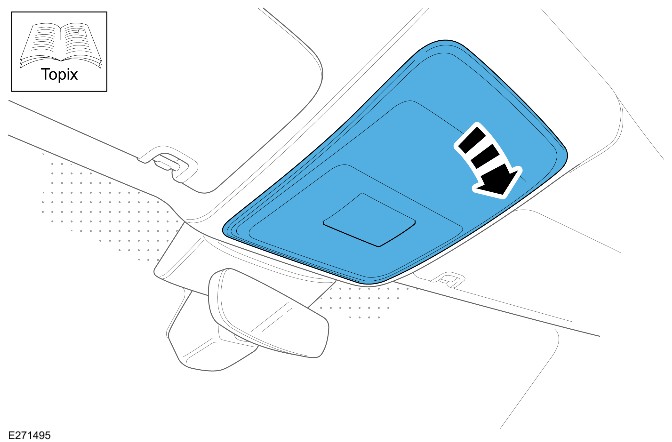
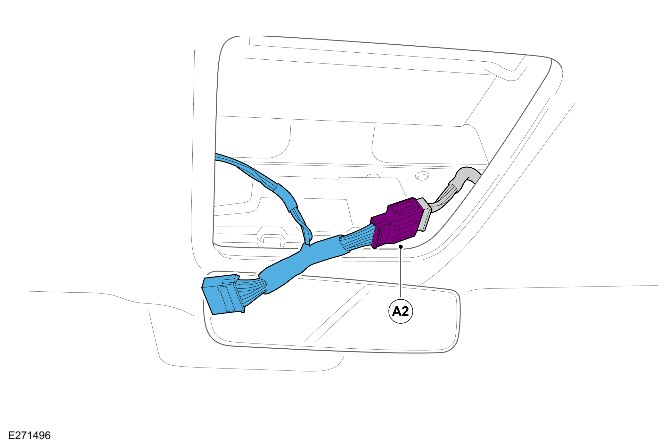
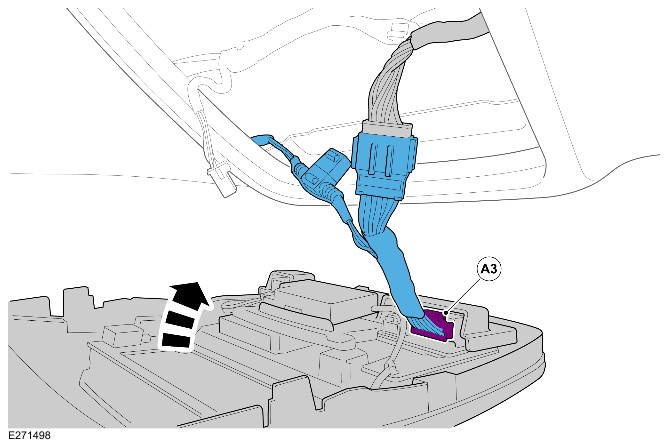
Do not position the camera that is obscured by the windsheild 'frit' area.



-
WARNING:
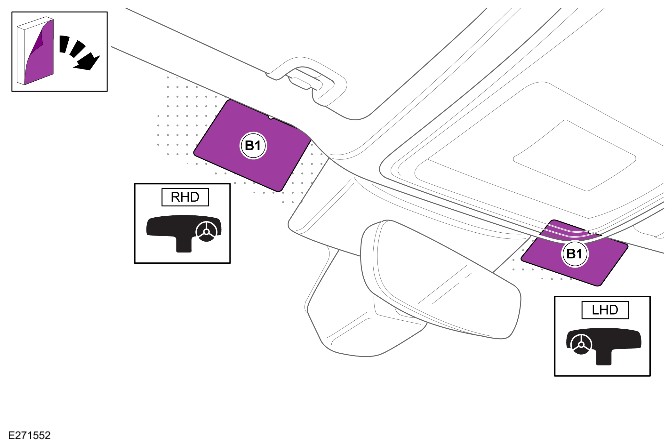
Front camera is to always be positioned on the passenger side of vehicle, (RHD) shown.
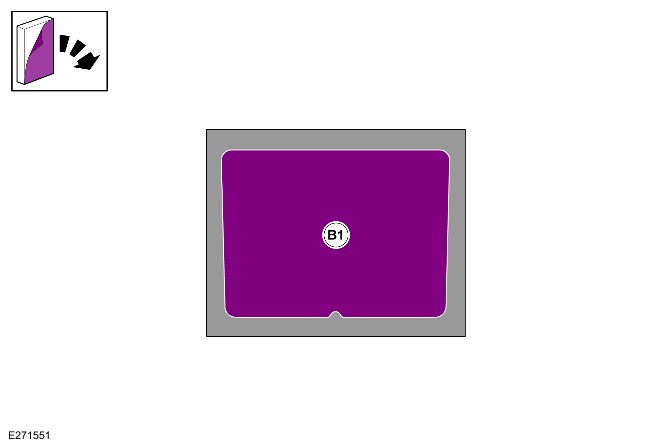
NOTE:Make sure the windshield is clear of any contaminants before applying sticker.
Install (B1) by pealing back the adhesive tape and stick it to the windsheild 'frit' area where the camera (B) will be installed.
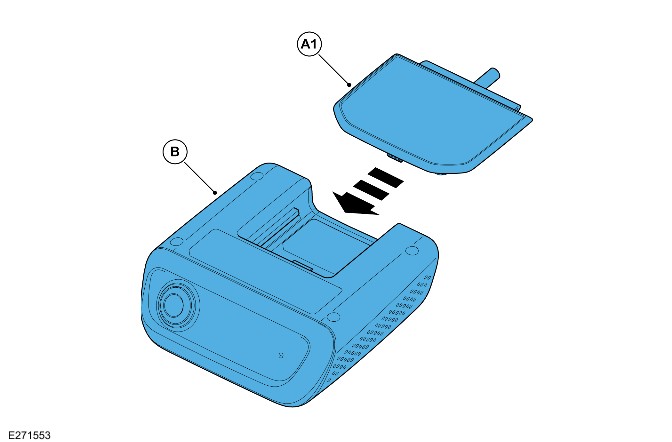
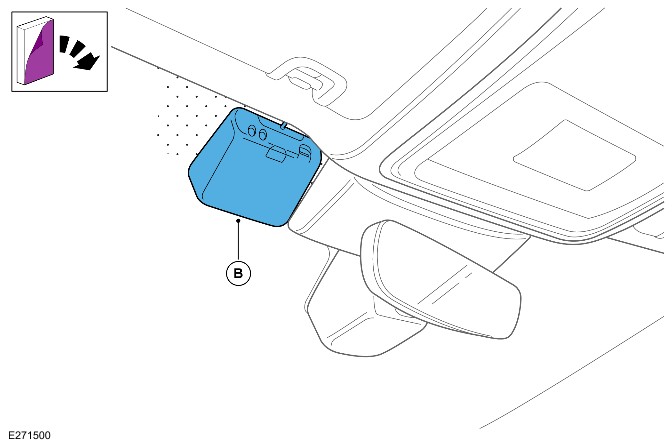
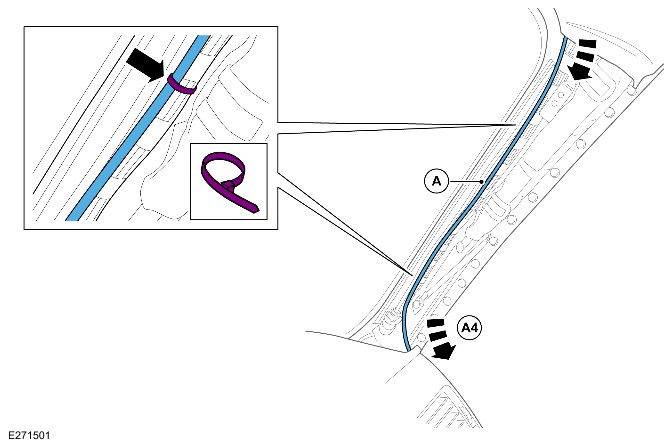
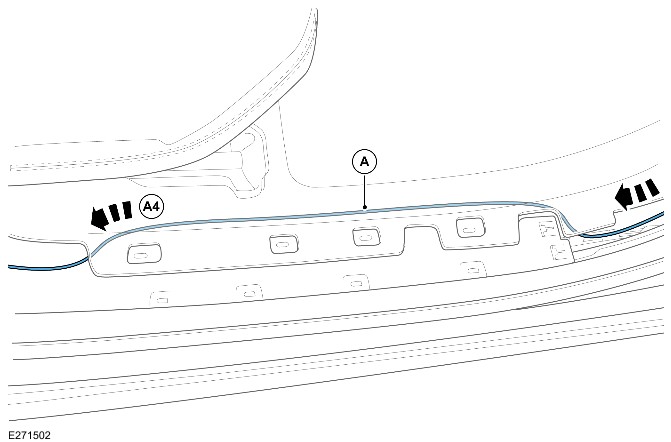
-
CAUTION:
Make sure harness is not trapped when refitting trim.
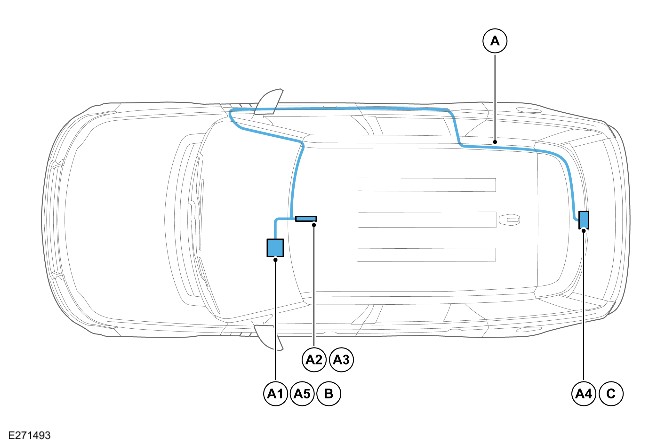
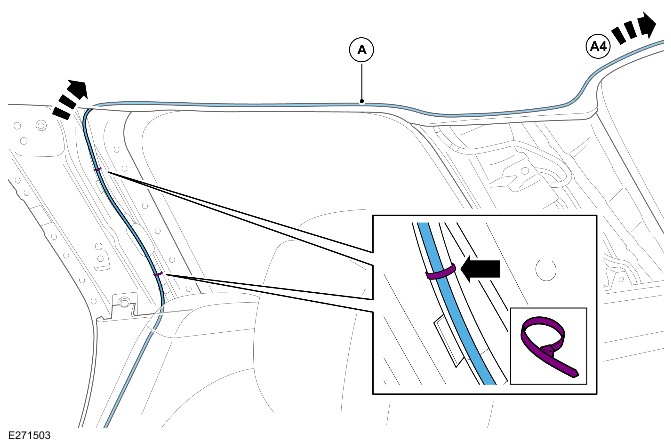
Remove lower and upper C-pillar trim and upper D-pillar trim. Feed harness end (A4) up the C-Pillar into the headliner securing to the vehicle harness with cable ties. Use suitable tape and foam rolls (F) as required to secure harness to headliner and to prevent rattling.
-
CAUTION:
Make sure the dashcam lens is not obscured by rear screen heater elements.
NOTES:-
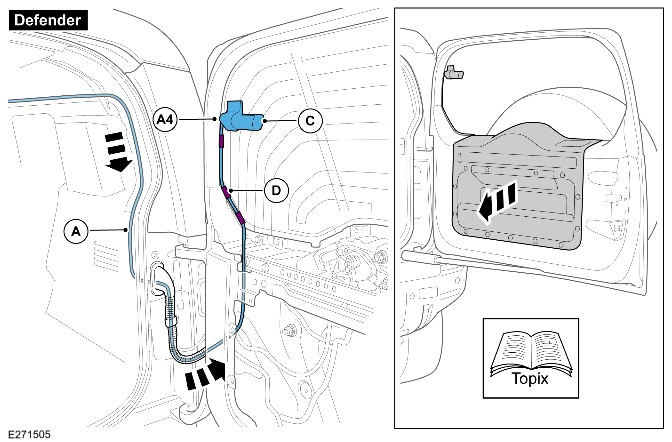
For Defender vehicles see step 16 for location of where the rear view camera could be installed.
-
Make sure surface is clean before applying adhesive tape.
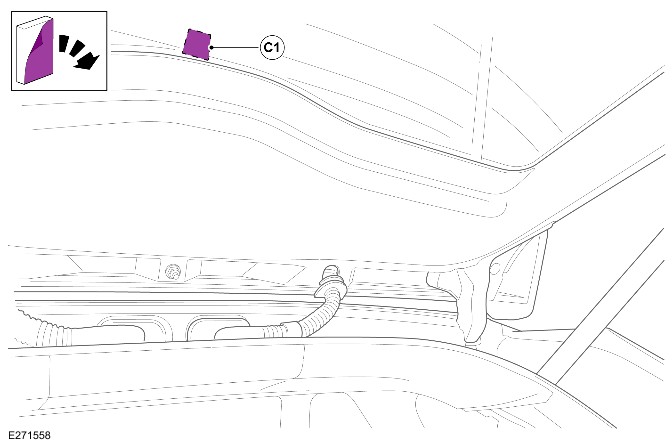
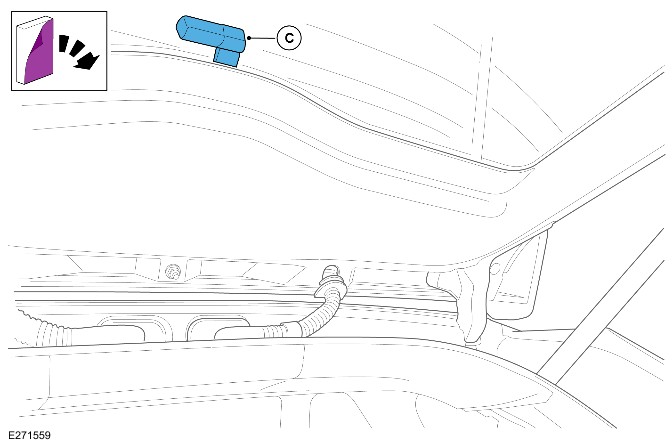
Open tailgate and install (C1) by pealing back the adhesive tape and stick it to the inner rear windsheild in the area illustrated. -
- For the correct tailgate routing procedure refer to the table and go to the corresponding illustration.
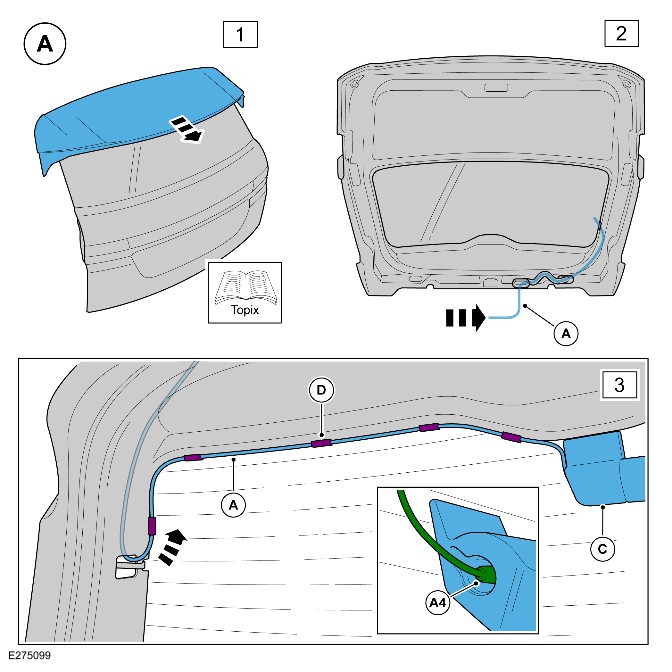
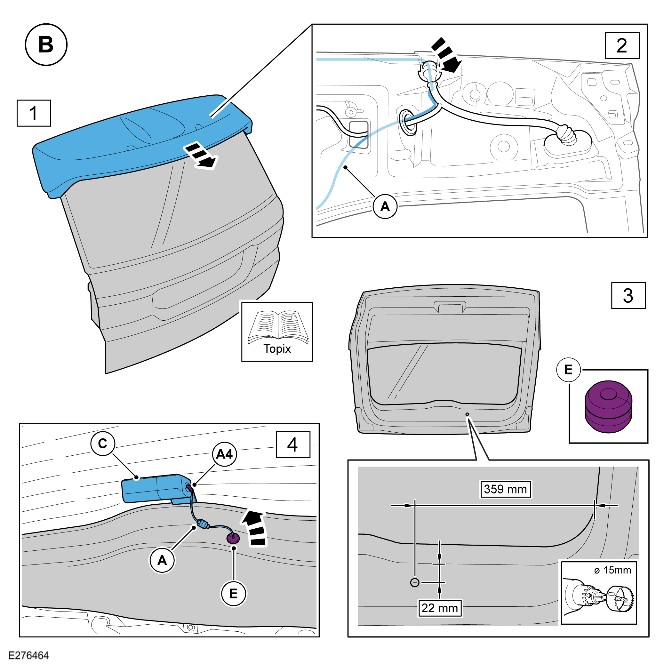
VEHICLE PLATFORM ILLUSTRATION Jaguar XE / XF / XJ Saloon (Step 16) New Defender / 90 / 110 / Commercial Defender (Step 17) Range Rover Velar Illustration A (Step 18) Range Rover Evoque Illustration A (Step 18) All New-Discovery / Discovery Commercial Illustration A (Step 18) Range Rover Sport Illustration A (Step 18) Jaguar XF Sportbrake Illustration A (Step 18) Jaguar F-Pace Illustration A (Step 18) New Range Rover Sport Illustration A (Step 18) Range Rover SWB / LWB Illustration B (Step 19) Discovery Sport Illustration C (Step 20) Jaguar E-Pace Illustration C (Step 20) New Range Rover SWB / LWB Illustration D (Step 21)
-
CAUTION:
Make sure the dashcam lens is not obscured by rear screen heater elements.
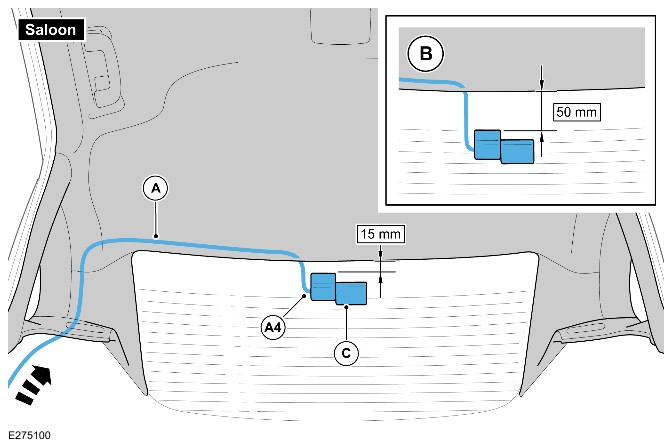
NOTE:For vehicles installed with a rear window blind refer to image 'B'.
Feed harness (A) through the D-pillar and into the headliner. Feed the harness end (A4) out of the headliner as illustrated and connect to rear view camera (C). Make sure the connection is fully seated in the camera socket.
-
CAUTION:
Make sure the dashcam lens is not obscured by rear screen heater elements.
Remove the inner tailgate trim. Refer to the workshop manual. Feed dashcam harness through the tailgate as illustrated. Secure harness with glass routing clips (D) as illustrated. Then connect (A4) to rear view camera (C). Make sure the connection is fully seated in the camera socket.
-
CAUTION:
Make sure the dashcam lens is not obscured by rear screen heater elements.
After performing the steps illustrated connect (A4) to rear view camera (C) when mounted on the glass. Make sure the connection is fully seated in the camera socket.- Refer to the workshop manual to remove the rear spoiler.
- Feed harness (A) through the grommet into the tailgate.
- Remove the heater element plastic trim cover and feed the harness out and along the tailgate trim using the routing clips to secure.
-
WARNING:
Extra care required when drilling to prevent damage to wiring and other panels behind.
CAUTIONS:-
Make sure the dashcam lens is not obscured by rear screen heater elements.
-
Protect surrounding trim with masking tape prior to drilling. Use appropriate size pilot drill.
After performing the steps illustrated connect (A4) to rear view camera (C) when mounted on the glass. Make sure the connection is fully seated in the camera socket.- Refer to the workshop manual to remove the rear spoiler.
- Feed harness (A) through the grommet into the tailgate and through the second circular grommet as shown.
- Drill a hole in the tailgate trim as shown and feed the harness (A) through using the grommet (E).
-
-
CAUTION:
Make sure the dashcam lens is not obscured by rear screen heater elements.
After performing the steps illustrated connect (A4) to rear view camera (C) when mounted on the glass. Make sure the connection is fully seated in the camera socket.- Refer to the workshop manual to remove the upper tailgate trim and using a suitable tool make a clearance on the edge in the area shown. Feed harness (A) through grommet.
- Install the tailgate trim with harness (A) routed through.
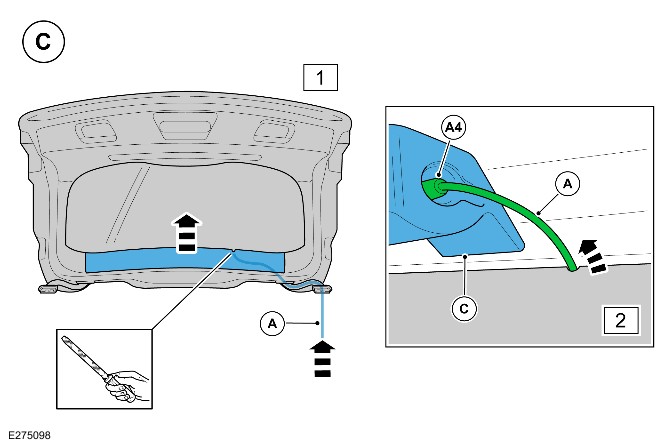
-
WARNING:
Extra care required when drilling to prevent damage to wiring and other panels behind.
CAUTIONS:-
Make sure the dashcam lens is not obscured by rear screen heater elements.
-
Protect surrounding trim with masking tape prior to drilling. Use appropriate size pilot drill.
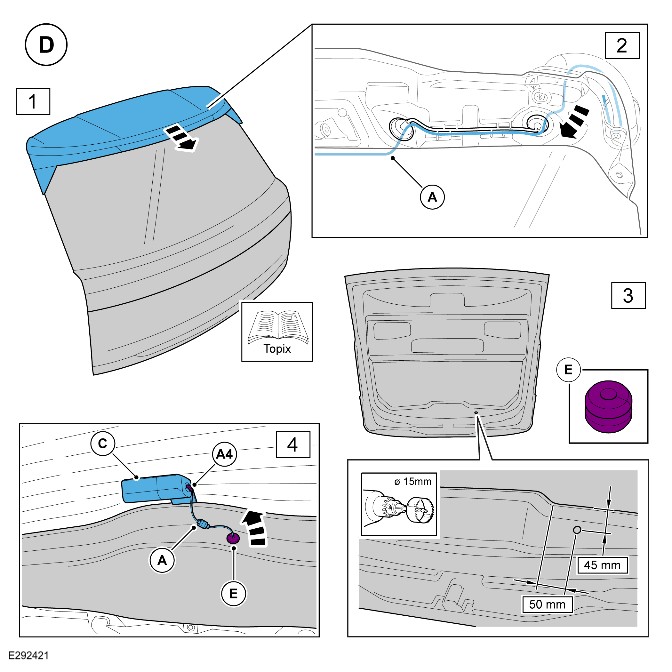
After performing the steps illustrated connect (A4) to rear view camera (C) when mounted on the glass. Make sure the connection is fully seated in the camera socket.- Refer to the workshop manual to remove the rear spoiler.
- Feed harness (A) through the grommet into the tailgate and through the second circular grommet as shown.
- Drill a hole in the tailgate trim as shown and feed the harness (A) through using the grommet (E).
-
-
NOTE:
For installations in vehicles that do not appear specifically in the country listing choose option 'other countries'. Please inspect that the default settings comply with the legislation for that country.
The country of use must be set up during installation of the dashcam to make sure correct default settings. This can be set, and other diagnostics can be accessed, by using ‘Diagnostics Mode’.- Diagnostics Mode can be activated by pressing both dashcam switches for over 3 seconds in Normal Mode. Both switches Light Emitting Diode (LED)'s will turn amber.
- When this switch press is detected, the device will change WiFi security to OPEN.
- Connect mobile device or computer to the open WiFi network.
- Turn off mobile data.
- Type http://192.168.1.1/diagnostics into a web browser then this will open diagnostics page.
- Set correct settings for market and select ‘Apply’.
- Diagnostics Mode can be changed back to Normal Mode with the following procedure.
- Diagnostics Mode can only be maintained for 10minutes. (Elapsed Time will show the remaining time) After this, the system will reboot to restart Normal Mode automatically.
- Press Power switch for 5 seconds then power on. This will also make the system restart into Normal Mode