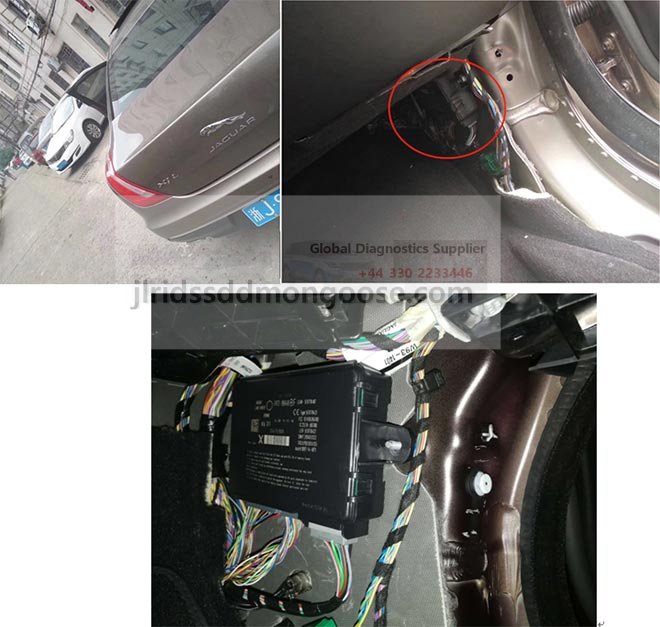
KVM Module Range Rover Jaguar Key Programmer device FK72
KVM Module Range Rover Jaguar Key Programmer device FK72
NEW RANGE ROVER /LAND ROVER / JAGUAR KEY LEARNING DEVICE BY OBD II 2010-2017 - key programmer ready to cover latest versions that support CAN based models from 2010 up to 2017 FK72 Versions of KVM
Latest JLR SDD v152 +. Programming and Diagnostics Laptop Package
Generate Key Via KVM Land Rover Jaguar KVM (Keyless Vehicle Modules) File Service Via Post
Generate Key Via KVM Land Rover Jaguar KVM (Keyless Vehicle Modules) File Service Via Post

F-Type: SECURITY SYSTEM
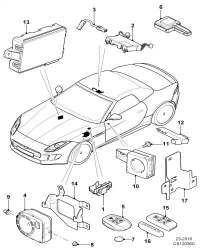
- 1. Under bonnet security switch
- 2. Intrusion sensor
- 3. Link lead
- 4. Security sounder
- 5. Key fob transmitter
- 6. Antenna
- 7. Battery
- 8. Hexagonal nut
- 9. Rubber grommet
- 10. Transceiver
- 11. Screw
- 12. Antenna
- 13. Control module
- 14. Support bracket
- 15. Kit-key fob cover
- 16. Key fob end cap cover
- 17. Bracket
TOPIx - SSM72205 - Fault code F000-63/U3000-63 logged in the KVM(Keyless vehicle
Reference SSM72205
Models Discovery Sport / L550 LR2 / L359 Range Rover / L322 Range Rover / L405 Range Rover Evoque / L538 Range Rover Sport / L320 Range Rover Sport / L494
Title Fault code F000-63/U3000-63 logged in the KVM(Keyless vehicle module)
Category Electrical
Last modified 05-Mar-2015 00:00:00
Symptom 203000 Basic Electrical Content Issue Only applicable to software versions 30.3 (GEN 3) FK72-14C104-AF and 29.3 (GEN 2) DPLA-14C104-AG When checking for fault codes logged in the KVM (keyless vehicle module) also known as the RFA (remote function actuator) F000-63/U3000-63,
Control Module - Circuit/ Component Protection Time-Out is logged. Cause This DTC is set when the KVM has gone through a “self reset” Action This DTC will not have any effect on functionality. The module must not be replaced .Please carry out a DTC clear. There is a possibility that it will keep appearing This issue will be resolved with a later release of software
New Remote Function Actuator (RFA) cannot communicate with Symptom Driven Diagnostics (SDD)
Reference SSM72557 Models FTYPE / X152 XE / X760 XF / X260 XJ / X351
Title New Remote Function Actuator (RFA) cannot communicate with Symptom Driven Diagnostics (SDD) Category Diagnostic Software Hardware
Last modified 24May2016 00:00:00
Symptom 000101 Diagnostic Concerns Content Issue: X152 – FType: From 16MY onwards X351 – XJ: From 15MY onwards X260 – XF: From 16MY onwards X760 – XE: From 16MY onwards
When fitting a new Remote Function Actuator (RFA) (referred to as the Keyless Vehicle Module KVM on SDD) with a module part number of: FK7219H440 AE FK7219H440 BE FK7219H440 AF FK7219H440 BF SDD cannot communicate with the RFA.
This will be displayed as a red 'X' for the RFA in the SDD vehicle specification screen. Cause: The new RFA module now supplied through parts is manufactured with preprogrammed software for 'DUAL CAN' vehicles.
These vehicles are 'MULTICAN' and not 'DUAL CAN' and will not communicate with SDD for programming or update without completing the action instructions detailed below. Action: Complete the following steps when replacing the RFA:
1. Use TOPIx to identify the 5 Amp fuse that supplies the power to pin 20 of the RFA.
2. Set the vehicle ignition to ‘ON’ placing the Smart Key against the Immobilizer Antenna Unit (IAU).
3. Disengage the Electronic Parking Brake (EPB).
4. Locate the fuse box in the vehicle.
5. Remove and refit the 5 Amp fuse for the RFA.
6. Refresh the data collect and confirm if the RFA is now communicating.
7. Select Configure new modules Keyless vehicle module and follow the on screen instructions in SDD. NOTE: If the ignition cannot be switched on by placing the Smart Key against the IAU, complete the following steps: 1. Remove the 5 Amp fuse for the RFA. 2. Run the immobilization procedure. 3. When the ignition comes on, disengage the parking brake and immediately refit the RFA fuse. 4. Refresh the data collect and confirm if the RFA is now communicating. 5. Select Configure new modules Keyless vehicle module and follow the on screen instructions in SDD