

DOIP VCI baru yang disetujui JLR adalah satu-satunya unit yang akan kompatibel dengan Pathfinder dan semua kendaraan JLR dengan arsitektur kendaraan baru (dari Range Rover/Range Rover Sport (L405/L494) 17MY dan seterusnya) atau memungkinkan peningkatan diagnostik yang akan dilakukan Pathfinder menawarkan pengecer.
Selain aplikasi jalur kendaraan 17MY, DOIP VCI akan mampu berinteraksi dengan jalur kendaraan arsitektur Multi-CAN 14-16MY pada sistem diagnostik Pathfinder.
Transfer Bank untuk Pembayaran saja Diterima untuk perangkat ini
Jalur kendaraan 14-16MY dengan dukungan DOIP VCI:
XE (X760)
F-Pace (X761)
Tipe-F (X152)
XF (X260)
XJ (X351) – 16MY saja
Evoque (L538)
Olahraga Penemuan (L550)
Range Rover (L405)
Range Rover Sport (L494)
Pra-14MY dan kendaraan yang tidak dirinci di atas akan terus menggunakan sistem diagnostik dan VCI saat ini.
Untuk sistem Ready to Go dengan opsi Aktivasi SDD Laptop dan Pathfinder lihat tautan di bawah
Anda tidak memerlukan Akun Topix.


Unit baru yang disetujui JLR Diagnostics over Internet Protocol (DoIP) Vehicle Communication Interface (VCI) adalah satu-satunya unit yang akan kompatibel dengan Pathfinder dan semua kendaraan JLR dengan arsitektur kendaraan baru (dari Range Rover/Range Rover Sport (L405/L494) ) 17MY dan seterusnya) atau izinkan diagnostik yang disempurnakan yang akan ditawarkan Pathfinder kepada pengecer.
Ikhtisar Produk JLR VCI
- Perangkat yang Disetujui Jaguar Land Rover
- Pengganti JLR SDD VCI's
- Mencakup Jaringan Kendaraan CAN, MultiCAN, ISO9141, dan SCP
- Cocok untuk Kendaraan Lawas, Saat Ini, dan Masa Depan
- Kabel USB 2m sebagai standar disertakan
- Mudah diperbarui untuk J2534 pembaruan fungsionalitas baru JLR VCI terhubung langsung ke konektor OBDII (Diagnostik) kendaraan, kemudian terhubung ke laptop melalui kabel USB untuk digunakan dengan SDD. Setelah file DLL J2534 dimuat, produk ini akan memungkinkan pengoperasian normal dengan Alat Diagnostik JLR SDD. Semua komunikasi dimungkinkan dengan perangkat ini.
Paket termasuk
1 pc x OEM Asli JLR DoiP VCI
1 pc x kabel OBD
1 pc x kabel USB
1 pc x kabel jaringan
Fungsi yang Didukung Jaguar Land Rover DoIP VCI:
- Bekerja dengan model setelah 2017, mendukung aplikasi perangkat lunak Pathfinder
- Bekerja dengan model sebelum 2016, mendukung perangkat lunak SDD.
- Mendukung semua protokol diagnostik & pemrograman SDD.
- Mendukung semua protokol diagnostik & pemrograman Pathfinder
- Mendukung layanan aktivasi Pathfinder offline.
- Mendukung koneksi WIFI
- Mendukung pengeditan file VBF
- Mendukung pengeditan file E-XML
- Mendukung aplikasi perangkat lunak rekayasa SDD
- Mendukung aplikasi perangkat lunak rekayasa Pathfinder
- Mendukung pemrograman online, pengkodean & pemrograman kunci
- Perangkat lunak SDD dapat memperbarui ke versi terbaru dengan bantuan insinyur pabrikan, dan bekerja dipemrograman garis.
- Pathfinder dapat memperbarui ke versi terbaru dengan bantuan insinyur pabrikan, dan melakukan pemrograman online.
- Dapat menggantikan kotak JLR VCI
- Dapat menggantikan kotak JLR DoIP VCI
- JLR DoIP VCI BARU adalah antarmuka terbaru untuk kendaraan Jaguar dan Land Rover.
Perangkat lunak Pathfinder
Ini adalah satu-satunya unit yang akan kompatibel dengan Perangkat Lunak Pathfinder dan semua kendaraan JLR dengan arsitektur kendaraan baru yang ditemukan pada tahun 2017 dan kendaraan yang lebih baru (dari Range Rover/Range Rover Sport L405/L494). Selain kendaraan 2017 dan yang lebih baru, DoIP VCI juga akan mampu berinteraksi dengan kendaraan arsitektur Multi-CAN 2014 hingga 2019 (lihat daftar aplikasi di bawah).
Perangkat lunak SDD
Semua 2014-2018 tanpa DOIP dan sebelumnya (2006 hingga 2014) land rover dan Jaguar akan tetap menggunakan perangkat lunak SDD JLR.
Kendaraan 14-16MY dengan dukungan DOIP VCI
- XE (X760)
- F-Pace (X761)
- Tipe-F (X152)
- XF (X260)
- XJ (X351) – 16MY saja
- Evoque (L538)
- Olahraga Penemuan (L550)
- Range Rover (L405)
- Range Rover Sport (L494)
Pra-14MY dan kendaraan yang tidak dirinci di atas akan terus menggunakan sistem diagnostik dan VCI saat ini. Untuk Land Rover dari 1998-2009, sepenuhnya kompatibel dengan Platform Produk T4. Perangkat lunak T4 Mobile Plus System dapat bekerja dengan Windows XP dan Windows 10.
Pertanyaan yang Sering Diajukan di JLR DOIP
Bagaimana cara JLR VCI diperbarui untuk Pembaruan Perangkat Lunak di masa mendatang?
Secara berkala JLR akan merilis update driver dan software produknya. Pembaruan ini diperlukan untuk merilis fungsionalitas perangkat lebih lanjut atau untuk menyelesaikan masalah lapangan.
Pembaruan driver dan perangkat lunak ditangani oleh aplikasi uji diagnostik yang akan menginstal pembaruan berdasarkan permintaan. Jika masalah dialami selama penggunaan perangkat, selalu pastikan bahwa perangkat lunak dan driver perangkat terbaru telah diinstal.
Bagaimana cara menginstal unit antarmuka komunikasi kendaraan (VCI) Diagnostics over Internet Protocol (DoIP)?
Sebelum Instalasi:
- PATHFINDER memerlukan unit DoIP VCI untuk berkomunikasi dengan Range Rover L405 model tahun 2017, Range Rover Sport L494, dan New Discovery L462.
- VCI DoIP harus menjadi satu-satunya VCI yang terhubung ke Peralatan Diagnostik yang Disetujui JLR saat menggunakan PATHFINDER. Komunikasi PATHFINDER masa depan akan segera muncul di bagian 'Aliran Aktivitas' di Topix. Setiap pengecer HARUS memiliki DoIP VCI yang tersedia di bengkel mereka. DoIP VCI adalah satu-satunya unit VCI yang disetujui JLR yang dapat berkomunikasi dengan kendaraan model tahun 2017 yang diidentifikasi sebelumnya.
- Perlu diketahui bahwa petunjuk berikut hanya berlaku untuk penggunaan pertama VCI. Setelah instalasi dan pengaturan awal selesai, DoIP VCI plug and play dengan perangkat lunak PATHFINDER.
- Masukkan kabel USB DoIP VCI ke perangkat DoIP VCI dan Peralatan Diagnostik yang Disetujui JLR.
Catatan: Akan muncul pop-up 'USB Input Device', pilih 'X' dan tutup pop-up. - Pilih tombol 'Windows'.
- Pilih 'Semua Program.
- Pilih 'Bosch'.
- Pilih 'Perangkat Lunak VCI (JLR)'.
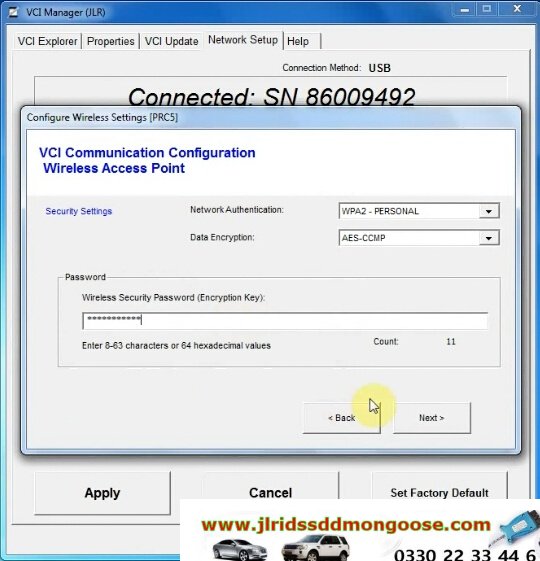
- Pilih 'Manajer VCI (JLR)'.
- Pilih ikon VCI yang ditampilkan di layar.
- Pilih 'Hubungkan ke VCI'
- Pilih 'Pembaruan VCI'.
- Pilih 'Mulai Pembaruan'.
- Akan muncul pop-up 'VCI Manager Information', pilih 'OK' untuk melanjutkan.
Catatan: Jangan putuskan sambungan DoIP VCI dari Peralatan Diagnostik yang Disetujui JLR selama proses pembaruan.
Catatan: Proses pembaruan DoIP VCI akan memakan waktu sekitar 12 menit untuk diselesaikan. - DoIP VCI sekarang akan restart secara otomatis.
Tunggu hingga DoIP VCI mengeluarkan bunyi bip. Pilih 'OK' untuk melanjutkan. - Pilih 'X' dan tutup 'VCI Manager'.
DoIP VCI siap digunakan Pengaturan Preferensi di PATHFINDER
Bagaimana Mengatur Preferensi di PATHFINDER?
- Pilih ikon PATHFINDER pada 'JLR Application Launcher.
- Pilih 'Pengguna Lain' dan masukkan 'Identifikasi Pengguna' dan detail Kata Sandi Anda.
- Pilih 'Operator Independen' atau 'Reparator Resmi'.
- Pilih 'OK' dan masuk.
- Baca konten pop-up 'Peringatan' dan pilih 'OK'.
- Pilih ikon tiga bilah di kanan atas layar. Pilih ikon 'Setelan''.
- Pilih tab 'Antarmuka Komunikasi'. Pilih 'D-PDU'.
- Munculan 'Windows Security Alert – Windows Firewall' akan ditampilkan.
Catatan: Jangan pilih 'Cancel' saat pop-up 'Windows Security Alert' ditampilkan. - Pada pop-up 'Windows Security Alert – Windows Firewall', pilihkotak centang untuk 'Jaringan Pribadi' dan 'Jaringan Publik', lalu pilih 'Izinkan Akses'.
- Preferensi sekarang telah diatur di PATHFINDER.
Catatan: Setelah instalasi dan pengaturan awal selesai, DoIP VCI plug and play dengan perangkat lunak PATHFINDER.
KVM Security Type
- 3 Plug HPLA-19H440-BF (DOIP)
- 2 Plug HPLA-19H440-AD (DOIP)
- 2 Plug FK72-19H440-AG / AH (Before DOIP)
- 2 Plug FK72-19H440-AH (Before DOIP)
- 3 Plug FK72-19H440-BC (Before DOIP)
- 3 Plug FK72-19H440-BF (Before DOIP)
- 3 Plug FK72-19H440-BH Before DOIP
- 3 Plug 3 Plug FK72-19H440-BC (Before DOIP)
- 3 Plug FK72-19H440-BD (Before DOIP)
- 3 Plug FK72-19H440-BF (Before DOIP)
- 3 Plug FK72-19H440-BH (Before DOIP)
- K8D2-19H440-BB
- JPLA-19H440-DE
- JPLA-19H440-CE (DOIP)
- J9C3-19H440-CF (DOIP)
- J9C3-19H440-AF (DOIP)
- Before DOIP DPLA
- Before DOIP KF72
- DOIP HPLA
- Latest DOIP K8D2
- Latest DOIP JPLA
- 2 Plug
- 3 Plug
- SDD
- Pathfinder
JLR SDD SOFTWARE VERSIONS
- SDD V131
- DoIP Stand for ?
-
Acronym Definition DOIP Dial Other Internet Providers (computer application) DoIP Domotics Over IP (Internet Protocol; automation technology) DOIP Digi Optical Image Processor (Sim2 Multimedia Fiber Optic Video Processor) DOIP Depot Operations Improvement Program DoIP Diagnostics over Internet Protocol (computing) - What is Diagnostic over Internet Protocol (DoIP) and How it Supports Remote Vehicle Diagnostics
-
What is Diagnostic over Internet Protocol (DoIP)?
As the name suggests, DoIP is the automotive diagnostics protocol based on IP. Defined by ISO 13400-2 standard, DoIP facilitates diagnostics related communication between external test equipments and automotive control units (ECU) using IP, TCP and UDP.
DoIP also supports communication between on-board and off-board diagnostic systems of a vehicle.
Because DoIP enables access to the vehicle electronic components (a.k.a Automotive ECU) through Internet, it becomes possible to fetch diagnostic data from vehicle remotely, without requiring physical access to the vehicle.
In simple words, DoIP stack serves as a gateway for all the next generation Remote Vehicle Diagnostics applications!
Since the standard Ethernet Physical layer is used as a transmission medium for DoIP, it is also known as Diagnostics over Ethernet.
Following are some of the advantages of Ethernet MAC layer of DoIP stack solution:
- Ethernet is a low-cost technology which allows high bandwidth for data communication.
- It is a flexible communication platform and can be easily integrated into existing
- It is light weighted, simple shielded structured cable.
- Why UDS over Ethernet (as DoIP) for next generation automotive applications?
-
The ever growing complexity of electronic systems and need for large volume of data communication between vehicle networks, meant that automotive OEMs’and Suppliers felt the need for a more effective vehicle communication network like Ethernet.
Case in point: ECU re-programming, remote & on-board diagnostics are some examples of automotive applications that demand for faster data transfer rate.
As Ethernet physical layer doesn’t support bus like structure (like that in CAN), a switch is required for every network node. This ensures that Ethernet based DoIP supports rates of upto 100 mbps as compared to 500 kbps by CAN.
In the past, OEM’s provided diagnostic services over proprietary or KWP protocols. But the trend has shifted to more popular Unified Diagnostic Services (UDS) protocol that supports various BUS systems such as CAN, K-line, FlexRay and Ethernet.
Hence, UDS is now the most properly used standard for Diagnostic Protocol. DoIP transport layer is defined as a part of the UDS specification.
- ISO-OSI Model of DoIP based software architecture
-

- As mentioned before, ISO 13400-2 transport layer facilitates diagnostic communication between external test equipment and vehicle electronic components.
- The implementation of a common set of Unified Diagnostic Services (UDS) on Internet Protocol (UDSonIP) is done using ISO 14229-5 Application layer.
- The Vehicle transport layer is facilitated by TCP or UDP. Based on the standard, IPv6 acts a Network Layer and IPv4 can be used for compatibility.
- Ethernet MAC is used as the Data Link Layer. The corresponding Physical Layer for on-board communication is specifies as Broad Reach or 100 Base T, while that for off-board communication is Ethernet.

Here is a comparison between UDS on IP and UDS on CAN, on the basis of system architecture and data transmission:
On the basis of systems architecture:
- UDS application layer has been modified to support compatibility with Ethernet transmission medium. This compatibility for UDS on IP is defined by ISO 14229-5 standard.
- UDS on IP has DoIP Transport Layer defined by ISO 13400-2 standard. While UDS on CAN has ISO 15765-2 transport layer that support CAN physical layer.
- The physical layer for UDS on IP is Ethernet, based on IEEE 802.3, a wired vehicle interface standard and the UDS on CAN is defined by ISO 11898 standard (classical CAN network).
While the ISO 14229-3 standard defines implementation of UDS on CAN.
On the basis of Data Transmission:
- UDS on IP supports greater latency time of data transmission as compared to CAN.
- A greater bandwidth capacity in DoIP enables it to handle large amount of data in comparison with CAN.
- The standardized data format in DoIP makes the data less prone to error and ideal for diagnostic services.
Important Features of ISO 13400-2:2012
ISO 13400-2:2012 defines the requirement for vehicle gateway (for an instance, for integration into an existing computer network) and requirements for the test equipment (for example, to detect and establish communication with vehicle).
ISO 13400-2 is a significant for diagnostic communication. Here are some of its important features:
- Vehicle network integration (IP address assignment).
- Vehicle announcement and vehicle discovery.
- Vehicle basic status information retrieval (example: diagnostic power mode).
- Connection establishment, connection maintenance and vehicle gateway control.
- Data routing to and from the vehicle’s sub components.
- Error handling (example: physical network disconnect).
The optional features of ISO 13400-2:2012 –
- DoIP entity status monitoring.
- DoIP entity firewall capabilities.