

新しいJLR承認のDOIPVCIは、Pathfinderおよび新しい車両アーキテクチャ(Range Rover / Range Rover Sport(L405 / L494)17MY以降)を備えたすべてのJLR車両と互換性がある、またはPathfinderが行う拡張診断を可能にする唯一のユニットです。小売業者に提供します。
17MY車両ラインアプリケーションに加えて、DOIP VCIは、パスファインダー診断システム上の14-16MYマルチCANアーキテクチャ車両ラインとインターフェースすることができます。
これらのデバイスでのみ受け入れられる支払いのための銀行振込
DOIP VCIをサポートする14-16MY車両ライン:
XE(X760)
Fペース(X761)
Fタイプ(X152)
XF(X260)
XJ(X351)–16MYのみ
Evoque(L538)
ディスカバリースポーツ(L550)
レンジローバー(L405)
レンジローバースポーツ(L494)
14MY以前および上記に詳述されていない車両は、現在の診断システムおよびVCIを引き続き使用します。
ラップトップおよびパスファインダーSDDアクティベーションオプションを備えたReadyto Goシステムについては、以下のリンクを参照してください。
Topixアカウントは必要ありません。


新しいJLR承認のDiagnosticsover Internet Protocol(DoIP)車両通信インターフェース(VCI)ユニットは、Pathfinderおよび新しい車両アーキテクチャ(Range Rover / Range Rover Sport(L405 / L494)のすべてのJLR車両)と互換性がある唯一のユニットです。 )17MY以降)またはPathfinderが小売業者に提供する拡張診断を許可します。
JLRVCI製品の概要
- ジャガーランドローバー承認済みデバイス
- JLR SDDVCIの代替品
- CAN、MultiCAN、ISO9141、およびSCP車両ネットワークをカバーします
- レガシー、現在、および将来の車両に適しています
- 2mUSBケーブルを標準装備
- J2534の更新が簡単新機能の更新JLRVCIは、車両のOBDII(診断)コネクタに直接接続し、SDDで使用するためにUSBケーブルを介してラップトップに接続します。 J2534 DLLファイルがロードされると、この製品はJLRSDD診断ツールで通常の操作を可能にします。このデバイスとのすべての通信が可能です。
パッケージに含まれるもの
1pc xOEMオリジナルJLRDoiP VCI
1pc xOBDケーブル
1個xUSBケーブル
1個xネットワークケーブル
ジャガーランドローバーDoIPVCIでサポートされている機能:
- 2017年以降のモデルで動作し、Pathfinderソフトウェアアプリケーションをサポートします
- 2016年より前のモデルで作業し、SDDソフトウェアをサポートします。
- SDDのすべての診断およびプログラミングプロトコルをサポートします。
- パスファインダーの診断およびプログラミングプロトコルをすべてサポートする
- パスファインダーアクティベーションサービスをオフラインでサポートします。
- WIFI接続をサポート
- VBFファイル編集をサポート
- E-XMLファイル編集をサポート
- SDDエンジニアリングソフトウェアアプリケーションをサポート
- Pathfinderエンジニアリングソフトウェアアプリケーションをサポートする
- オンラインプログラミング、コーディング、キープログラミングをサポート
- SDDソフトウェアは、製造元のエンジニアの支援を受けて最新バージョンに更新し、ラインプログラミング。
- パスファインダーは、メーカーのエンジニアの助けを借りて最新バージョンに更新し、オンラインプログラミングを実行できます。
- JLRVCIボックスを交換できます
- JLR DoIPVCIボックスを交換できます
- 新しいJLRDoIP VCIは、ジャガーおよびランドローバー車両用の最新のインターフェースです。
パスファインダーソフトウェア
これは、Pathfinder Softwareと、2017年に見つかった新しい車両アーキテクチャ(Range Rover / Range Rover Sport L405 / L494から)のすべてのJLR車両と互換性がある唯一のユニットです。 2017年以降の車両に加えて、DoIP VCIは、2014年から2019年までのマルチCANアーキテクチャ車両とのインターフェースも可能になります(以下のアプリケーションリストを参照)。
SDDソフトウェア
DOIPのない2014年から2018年まで、およびそれ以前(2006年から2014年)のランドローバーとジャガーは、引き続きSDDJLRソフトウェアを使用します。
DOIPVCIをサポートする14-16MY車両
- XE(X760)
- Fペース(X761)
- Fタイプ(X152)
- XF(X260)
- XJ(X351)–16MYのみ
- Evoque(L538)
- ディスカバリースポーツ(L550)
- レンジローバー(L405)
- レンジローバースポーツ(L494)
14MY以前および上記に詳述されていない車両は、現在の診断システムおよびVCIを引き続き使用します。 1998年から2009年までのランドローバーの場合、 T4製品プラットフォームと完全に互換性があります。 T4 Mobile Plus Systemソフトウェアは、WindowsXPとWindowsXPの両方で動作します。 ウィンドウズ10。
JLRDOIPに関するよくある質問
JLR VCIは、将来のソフトウェアアップデートのためにどのようにアップデートされますか?
JLRは、製品のドライバーとソフトウェアのアップデートを定期的にリリースします。これらの更新は、デバイスの機能をさらにリリースするか、フィールドの問題を解決するために必要です。
ドライバーとソフトウェアの更新は、要求に応じて更新をインストールする診断テストアプリケーションによって処理されます。デバイスの使用中に問題が発生した場合は、常に最新のデバイスソフトウェアとドライバーがインストールされていることを確認してください。
Diagnostics over Internet Protocol(DoIP)Vehicle Communication Interface(VCI)ユニットをインストールする方法は?
インストール前:
- PATHFINDERには、2017年モデルのレンジローバーL405、レンジローバースポーツL494、およびニューディスカバリーL462と通信するためのDoIPVCIユニットが必要です。
- PATHFINDERを使用する場合、DoIP VCIは、JLR承認済み診断機器に接続されている唯一のVCIである必要があります。今後のPATHFINDER通信は、Topixの「アクティビティストリーム」セクションにまもなく表示されます。すべての小売業者は、ワークショップでDoIPVCIを利用できるようにする必要があります。 DoIP VCIは、以前に特定された2017年モデルの車両と通信できる唯一のJLR承認済みVCIユニットです。
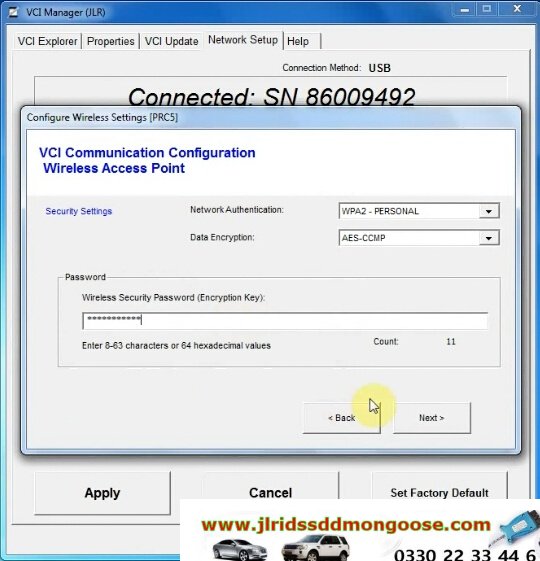
- 以下の手順は、VCIの最初の使用にのみ適用されることに注意してください。初期インストールと設定が完了すると、DoIPVCIはPATHFINDERソフトウェアでプラグアンドプレイされます。
- DoIP VCIUSBケーブルをDoIPVCIデバイスとJLR認定診断機器に挿入します。
注:「USB入力デバイス」ポップアップが表示されたら、「X」を選択してポップアップを閉じます。 - 「Windows」キーを選択します。
- 'すべてのプログラムを選択します。
- 「Bosch」を選択します。
- 「VCIソフトウェア(JLR)」を選択します。
- 「VCIマネージャー(JLR)」を選択します。
- 画面に表示されているVCIアイコンを選択します。
- [VCIに接続]を選択します
- 「VCIアップデート」を選択します。
- 「更新の開始」を選択します。
- 「VCIマネージャー情報」ポップアップが表示されます。「OK」を選択して続行します。
注:更新プロセス中は、DoIPVCIをJLR承認済み診断機器から切断しないでください。
注:DoIP VCIの更新プロセスは、完了するまでに約12分かかります。 - DoIPVCIが自動的に再起動します。
DoIPVCIからビープ音が鳴るのを待ちます。 [OK]を選択して続行します。 - 「X」を選択し、「VCIマネージャー」を閉じます。
DoIPVCIを使用する準備ができましたPATHFINDERでプリファレンスを設定する
PATHFINDERでプリファレンスを設定する方法は?
- 'JLRアプリケーションランチャーのPATHFINDERアイコンを選択します。
- 「その他のユーザー」を選択し、「ユーザーID」とパスワードの詳細を入力します。
- 「独立したオペレーター」または「認定修理業者」を選択します。
- 「OK」を選択してログインします。
- 「警告」ポップアップの内容を読み、「OK」を選択します。
- 画面の右上にある3本のバーのアイコンを選択します。 「設定」アイコンを選択します。
- 「通信インターフェース」タブを選択します。 「D-PDU」を選択します。
- 「Windowsセキュリティアラート–Windowsファイアウォール」ポップアップが表示されます。
注:「Windowsセキュリティアラート」ポップアップが表示されている場合は、「キャンセル」を選択しないでください。 - [Windowsセキュリティアラート– Windowsファイアウォール]ポップアップで、[[プライベートネットワーク]と[パブリックネットワーク]のチェックボックスをオンにして、[アクセスを許可]を選択します。
- これで、設定がPATHFINDERで設定されました。
注:初期インストールと設定が完了すると、DoIPVCIはPATHFINDERソフトウェアでプラグアンドプレイされます。
Supported Vehicles
- 2023
- 2022
- 2021
- 2020
- 2019
- 2018年
- 2017年
- 2016年
- 2015年
- 2014
- 2013年
- 2012年
- 2011年
- 2010年
- 2009年
- 2008年
- 2007年
- 2006年
- 2005年
KVM Security Type
- 3 Plug HPLA-19H440-BF (DOIP)
- 2 Plug HPLA-19H440-AD (DOIP)
- 2 Plug FK72-19H440-AG / AH (Before DOIP)
- 2 Plug FK72-19H440-AH (Before DOIP)
- 3 Plug FK72-19H440-BC (Before DOIP)
- 3 Plug FK72-19H440-BF (Before DOIP)
- 3 Plug FK72-19H440-BH Before DOIP
- 3 Plug 3 Plug FK72-19H440-BC (Before DOIP)
- 3 Plug FK72-19H440-BD (Before DOIP)
- 3 Plug FK72-19H440-BF (Before DOIP)
- 3 Plug FK72-19H440-BH (Before DOIP)
- K8D2-19H440-BB
- JPLA-19H440-DE
- JPLA-19H440-CE (DOIP)
- J9C3-19H440-CF (DOIP)
- J9C3-19H440-AF (DOIP)
- Before DOIP DPLA
- Before DOIP KF72
- DOIP HPLA
- Latest DOIP K8D2
- Latest DOIP JPLA
- 2 Plug
- 3 Plug
- SDD
- Pathfinder
JLR SDD SOFTWARE VERSIONS
- SDD V131
- DoIP Stand for ?
-
Acronym Definition DOIP Dial Other Internet Providers (computer application) DoIP Domotics Over IP (Internet Protocol; automation technology) DOIP Digi Optical Image Processor (Sim2 Multimedia Fiber Optic Video Processor) DOIP Depot Operations Improvement Program DoIP Diagnostics over Internet Protocol (computing) - What is Diagnostic over Internet Protocol (DoIP) and How it Supports Remote Vehicle Diagnostics
-
What is Diagnostic over Internet Protocol (DoIP)?
As the name suggests, DoIP is the automotive diagnostics protocol based on IP. Defined by ISO 13400-2 standard, DoIP facilitates diagnostics related communication between external test equipments and automotive control units (ECU) using IP, TCP and UDP.
DoIP also supports communication between on-board and off-board diagnostic systems of a vehicle.
Because DoIP enables access to the vehicle electronic components (a.k.a Automotive ECU) through Internet, it becomes possible to fetch diagnostic data from vehicle remotely, without requiring physical access to the vehicle.
In simple words, DoIP stack serves as a gateway for all the next generation Remote Vehicle Diagnostics applications!
Since the standard Ethernet Physical layer is used as a transmission medium for DoIP, it is also known as Diagnostics over Ethernet.
Following are some of the advantages of Ethernet MAC layer of DoIP stack solution:
- Ethernet is a low-cost technology which allows high bandwidth for data communication.
- It is a flexible communication platform and can be easily integrated into existing
- It is light weighted, simple shielded structured cable.
- Why UDS over Ethernet (as DoIP) for next generation automotive applications?
-
The ever growing complexity of electronic systems and need for large volume of data communication between vehicle networks, meant that automotive OEMs’and Suppliers felt the need for a more effective vehicle communication network like Ethernet.
Case in point: ECU re-programming, remote & on-board diagnostics are some examples of automotive applications that demand for faster data transfer rate.
As Ethernet physical layer doesn’t support bus like structure (like that in CAN), a switch is required for every network node. This ensures that Ethernet based DoIP supports rates of upto 100 mbps as compared to 500 kbps by CAN.
In the past, OEM’s provided diagnostic services over proprietary or KWP protocols. But the trend has shifted to more popular Unified Diagnostic Services (UDS) protocol that supports various BUS systems such as CAN, K-line, FlexRay and Ethernet.
Hence, UDS is now the most properly used standard for Diagnostic Protocol. DoIP transport layer is defined as a part of the UDS specification.
- ISO-OSI Model of DoIP based software architecture
-

- As mentioned before, ISO 13400-2 transport layer facilitates diagnostic communication between external test equipment and vehicle electronic components.
- The implementation of a common set of Unified Diagnostic Services (UDS) on Internet Protocol (UDSonIP) is done using ISO 14229-5 Application layer.
- The Vehicle transport layer is facilitated by TCP or UDP. Based on the standard, IPv6 acts a Network Layer and IPv4 can be used for compatibility.
- Ethernet MAC is used as the Data Link Layer. The corresponding Physical Layer for on-board communication is specifies as Broad Reach or 100 Base T, while that for off-board communication is Ethernet.

Here is a comparison between UDS on IP and UDS on CAN, on the basis of system architecture and data transmission:
On the basis of systems architecture:
- UDS application layer has been modified to support compatibility with Ethernet transmission medium. This compatibility for UDS on IP is defined by ISO 14229-5 standard.
- UDS on IP has DoIP Transport Layer defined by ISO 13400-2 standard. While UDS on CAN has ISO 15765-2 transport layer that support CAN physical layer.
- The physical layer for UDS on IP is Ethernet, based on IEEE 802.3, a wired vehicle interface standard and the UDS on CAN is defined by ISO 11898 standard (classical CAN network).
While the ISO 14229-3 standard defines implementation of UDS on CAN.
On the basis of Data Transmission:
- UDS on IP supports greater latency time of data transmission as compared to CAN.
- A greater bandwidth capacity in DoIP enables it to handle large amount of data in comparison with CAN.
- The standardized data format in DoIP makes the data less prone to error and ideal for diagnostic services.
Important Features of ISO 13400-2:2012
ISO 13400-2:2012 defines the requirement for vehicle gateway (for an instance, for integration into an existing computer network) and requirements for the test equipment (for example, to detect and establish communication with vehicle).
ISO 13400-2 is a significant for diagnostic communication. Here are some of its important features:
- Vehicle network integration (IP address assignment).
- Vehicle announcement and vehicle discovery.
- Vehicle basic status information retrieval (example: diagnostic power mode).
- Connection establishment, connection maintenance and vehicle gateway control.
- Data routing to and from the vehicle’s sub components.
- Error handling (example: physical network disconnect).
The optional features of ISO 13400-2:2012 –
- DoIP entity status monitoring.
- DoIP entity firewall capabilities.